The essentials, elevated.
Not a generic CRM. Not a retail inventory app.
A system shaped around the real work of running a gallery.
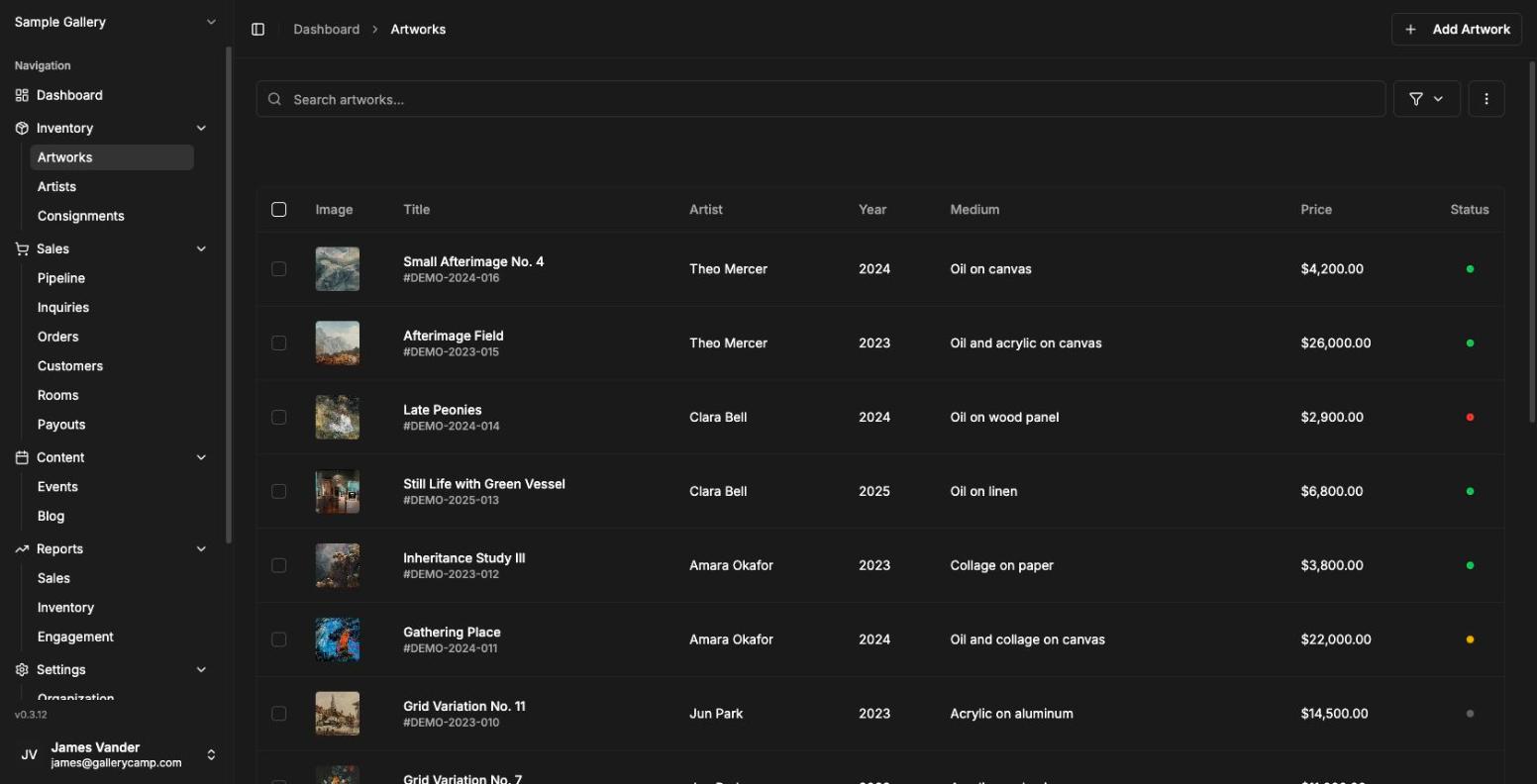
Artwork archive
A pristine record for every work: images, dimensions, medium, editions, provenance, availability, pricing, documents, notes, and history.
Collector memory
Know who asked, who viewed, who bought, what they collect, and when to follow up—without living inside scattered email threads.
Viewing rooms
Give every collector their own private link to a curated presentation—then see who opened it, how long they stayed, and which works they kept returning to.
Sales workflow
Move from inquiry to offer, reserve, invoice, order, and sold status with a clean operational trail your team can trust.
Send it to twelve people. Learn twelve different things.
A private viewing room used to be a link and a hope. Because every recipient in GalleryCamp has their own way in, the room comes back with something: who read it, what they lingered on, and who quietly forwarded it to their advisor.
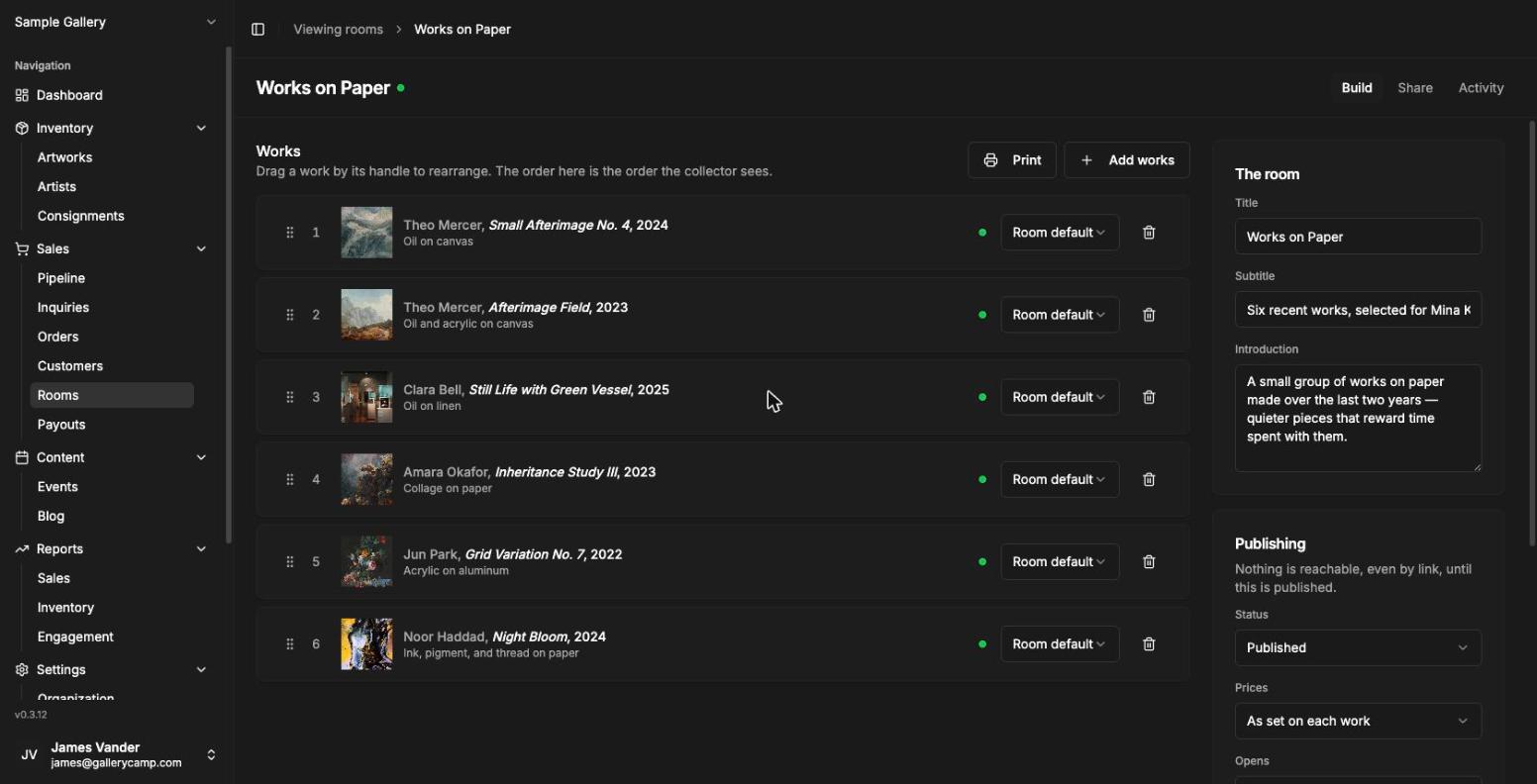
Curate
Build the room
Pull works straight from the archive, or start from an exhibition you have already installed. Set the order, open with a statement in your own voice, and write a caption that belongs to this presentation only—“the one I held back in Basel” is true of a room, not of the work.
Send
One link per person
Every collector, advisor, and curator gets their own way in, with a private note at the top that no other recipient can see. Add a passcode when the work warrants it, set when the room opens and when it closes, and preview the whole thing through a link that leaves no trace.
Read
See what the room did
Who opened it, how long they stayed, and which works held them—ranked rather than timed, because the order survives the noise in a way a stopwatch never does. Inquiries arrive already attached to the person, the room, and the exact work.
Opens and closes
A published room can still be shut. The schedule is what creates the urgency the whole format runs on.
Optional passcode
A second factor on top of the link itself, for the rooms where the link alone is not enough.
Price, per room
Shown, on request, or hidden—set for the room or a single work, without ever editing inventory.
A preview that stays quiet
Check your own work through a preview link that records no opens and no figures. Reading your own room should not look like a collector reading it.
The telescope is optional
Opens are always recorded—a gallery has to know its mail arrived. Per-artwork attention is a switch, off whenever you or your jurisdiction prefer.
Machines do not count
Link scanners and mail previewers are filtered out, so a security appliance never arrives looking like an interested collector.
01
Inventory that respects the object
GalleryCamp treats artwork records as the center of the system—not as products in a generic database. Every record is built to hold the complexity of an art object while staying beautiful enough to use every day.
02
A sharper collector and inquiry desk at your fingertips
Every gallery relationship is built over time. GalleryCamp gives your team a shared memory for collectors, preferences, conversations, inquiries, orders, and future opportunities.
03
Private presentations that read back
Send collectors a focused view of selected works instead of a clumsy PDF—and, because every recipient has their own way in, learn something from each send. A viewing room stops being a broadcast and becomes a conversation you can follow.
04
Operations and reporting from opening to invoice
The back office should be precise, not chaotic. GalleryCamp connects availability, holds, sales, invoices, locations, and documents so your team always knows what is happening.
05
An API that feeds the website you already have
You should not have to maintain your inventory twice. GalleryCamp publishes a read-only feed of your available work, so the site your designer built stays current on its own—and every inquiry it captures lands in your desk here, attributed to the exact artwork.
06
We move you in ourselves
Migrations are where gallery software usually goes wrong. Send us the spreadsheets, database exports, and half-finished inventories you already have—we help craft the import files, map every field, and get the account set up the way your program actually runs.
Everything included. Because gallery work is connected.
Inventory affects sales. Collector history informs viewing rooms. Locations matter to invoices. Documents belong with the object. GalleryCamp keeps the whole system together.
Fast search
Find a work, artist, collector, or order in seconds.
Image control
Manage high-resolution artwork photography with clarity.
Locations
Track works across spaces, storage, fairs, and consignments.
Reporting
Understand sales, inventory, inquiries, and activity at a glance.
Room activity
See who opened a viewing room, how long they stayed, and what held them.
Permissions
Decide, tool by tool, what each person on the team can see and what they can change.
Security
A secure workspace for sensitive artwork, collector, and sales data.
Public API
Feed available work to your website and capture inquiries back.
Guided migration
We help build your import files and set the account up with you.
How it compares
Thirty-eight capabilities, against the six platforms galleries actually shortlist.
Including the rows GalleryCamp loses. If you need an accounting sync, email campaigns, or an iPad app for the fair floor today, another platform is the better buy and this table will tell you so.
The object — inventory depth
Artwork records, images, multiple locations
- Artlogic
- ●
- ArtCloud
- ●
- Arternal
- ●
- ArtBase†
- ●
- Artwork Arch.
- ●
- Masterpiece
- ●
Editions and prints as structured records
Each impression is its own record — numbered, AP, PP, HC.
- Artlogic
- ●
- ArtCloud
- ●
- Arternal
- ●
- ArtBase†
- ●
- Artwork Arch.
- ●
- Masterpiece
- ●
Provenance and ownership chain
A dated chain of ownership you can reorder.
- Artlogic
- ●
- ArtCloud
- ◐
- Arternal
- ●
- ArtBase†
- ●
- Artwork Arch.
- ●
- Masterpiece
- ◐
Condition reports
Rated inspections with photographs, added rather than edited, so the record is evidence of a day.
- Artlogic
- ●
- ArtCloud
- ◐
- Arternal
- ●
- ArtBase†
- ●
- Artwork Arch.
- ◐
- Masterpiece
- ●
Framing, dimension variants, display notes
Height, width, depth and framed size are stored, come in with an import and print on tearsheets and price lists, but the form still edits one dimensions line.
- Artlogic
- ●
- ArtCloud
- ●
- Arternal
- ◐
- ArtBase†
- ●
- Artwork Arch.
- ◐
- Masterpiece
- ●
Appraisals, valuations, insurance schedules
Valuations are recorded through the API, with an insurance-coverage report that flags stale ones. No screen in the dashboard yet.
- Artlogic
- ◐
- ArtCloud
- ◐
- Arternal
- ◐
- ArtBase†
- ●
- Artwork Arch.
- ●
- Masterpiece
- ◐
QR and barcode labels, wall tags
Wall labels and tearsheets carry a QR code that opens the work's record. No barcodes.
- Artlogic
- ●
- ArtCloud
- ◐
- Arternal
- ●
- ArtBase†
- ●
- Artwork Arch.
- ●
- Masterpiece
- ●
Moving the work — consignment and logistics
Consignments in and out
Agreements, per-work lines, partial returns.
- Artlogic
- ●
- ArtCloud
- ●
- Arternal
- ●
- ArtBase†
- ●
- Artwork Arch.
- ◐
- Masterpiece
- ●
Loans and outbound tracking
The loan type drives the work's status on the way out and back.
- Artlogic
- ●
- ArtCloud
- ◐
- Arternal
- ●
- ArtBase†
- ●
- Artwork Arch.
- ◐
- Masterpiece
- ◐
Artist splits, commissions, payouts
A five-level rate ladder, statements that freeze their arithmetic, and a payment record. No statement goes out on a rate nobody set for the artist.
- Artlogic
- ●
- ArtCloud
- ●
- Arternal
- ●
- ArtBase†
- ◐
- Artwork Arch.
- ◐
- Masterpiece
- ●
Shipping, crating, customs paperwork
Shipping is a single amount on the order, and online-store orders carry the buyer's address. No crating or customs documents.
- Artlogic
- ●
- ArtCloud
- ◐
- Arternal
- ◐
- ArtBase†
- ●
- Artwork Arch.
- ○
- Masterpiece
- ◐
Art fair mode — fair lists, on-site sales
Not built yet, though a fair microsite can be run as its own site.
- Artlogic
- ●
- ArtCloud
- ◐
- Arternal
- ●
- ArtBase†
- ●
- Artwork Arch.
- ○
- Masterpiece
- ◐
The desk — collectors and sales
Collector records with purchase history
Orders, inquiries, rooms and notes on the record. Lifetime value counts paid orders only.
- Artlogic
- ●
- ArtCloud
- ●
- Arternal
- ●
- ArtBase†
- ●
- Artwork Arch.
- ◐
- Masterpiece
- ●
Interests, categories, related contacts
Tags and free-text notes, not a structured interest model.
- Artlogic
- ●
- ArtCloud
- ●
- Arternal
- ●
- ArtBase†
- ●
- Artwork Arch.
- ○
- Masterpiece
- ◐
Inquiry desk
Every inquiry carries its room, its recipient, and whether price was disclosed.
- Artlogic
- ●
- ArtCloud
- ●
- Arternal
- ●
- ArtBase†
- ●
- Artwork Arch.
- ◐
- Masterpiece
- ◐
Sales pipeline, offers, deal stages
Six stages, offers with expiry, holds. Accepting an offer raises the order.
- Artlogic
- ●
- ArtCloud
- ●
- Arternal
- ●
- ArtBase†
- ●
- Artwork Arch.
- ○
- Masterpiece
- ◐
Two-way email sync, sending as the dealer
Connect Gmail or Outlook: offers, room invitations and invoices leave from your own address, and the replies land on the collector's record. Gmail sync is in early access while Google completes its review; sending from Gmail works for everyone. No open or click tracking yet.
- Artlogic
- ●
- ArtCloud
- ●
- Arternal
- ●
- ArtBase†
- ◐
- Artwork Arch.
- ○
- Masterpiece
- ○
Email marketing campaigns
Not built yet.
- Artlogic
- ●
- ArtCloud
- ●
- Arternal
- ●
- ArtBase†
- ◐
- Artwork Arch.
- ○
- Masterpiece
- ●
Presentation — rooms, shows, web
Online viewing rooms
- Artlogic
- ●
- ArtCloud
- ●
- Arternal
- ●
- ArtBase†
- ◐
- Artwork Arch.
- ◐
- Masterpiece
- ○
Per-artwork engagement telemetry
Dwell and zoom per recipient, machine traffic filtered out, plus reads from your public sites attributed to the site that served them.
- Artlogic
- ◐
- ArtCloud
- ◐
- Arternal
- ●
- ArtBase†
- ○
- Artwork Arch.
- ○
- Masterpiece
- ○
Per-recipient links, passcode, open and close schedule
- Artlogic
- ●
- ArtCloud
- ◐
- Arternal
- ●
- ArtBase†
- ○
- Artwork Arch.
- ◐
- Masterpiece
- ○
Tearsheets, price lists, certificates, wall labels
Print-ready, saved as PDF by the browser. Internal prices never print unless you ask for them.
- Artlogic
- ●
- ArtCloud
- ●
- Arternal
- ●
- ArtBase†
- ●
- Artwork Arch.
- ●
- Masterpiece
- ●
Exhibitions, events, RSVP
- Artlogic
- ●
- ArtCloud
- ◐
- Arternal
- ◐
- ArtBase†
- ◐
- Artwork Arch.
- ○
- Masterpiece
- ◐
Public website with custom domain
Deliberately not ours to build. Galleries use their own designer or template and read their inventory from the public API — the incumbents sell the website as a service engagement, which is the part we are not competing on.
- Artlogic
- ●
- ArtCloud
- ●
- Arternal
- ●
- ArtBase†
- ◐
- Artwork Arch.
- ◐
- Masterpiece
- ●
Online store — buy-now checkout on your own site
Mark works for sale online and your website can sell them. We keep the cart, hold the work at checkout and take the payment; the storefront is your own site. Each sale arrives as an ordinary order.
- Artlogic
- ●
- ArtCloud
- ●
- Arternal
- ○
- ArtBase†
- ○
- Artwork Arch.
- ○
- Masterpiece
- ◐
Blog and editorial publishing
- Artlogic
- ●
- ArtCloud
- ●
- Arternal
- ◐
- ArtBase†
- ○
- Artwork Arch.
- ○
- Masterpiece
- ◐
Money
Invoicing
Rendered from the order itself, so there is only ever one set of totals. Sending one emails the collector a pay link, from your own address when your mailbox is connected.
- Artlogic
- ●
- ArtCloud
- ●
- Arternal
- ●
- ArtBase†
- ●
- Artwork Arch.
- ●
- Masterpiece
- ●
Collector payments — card, ACH, instalments
Stripe Connect on the order, so funds settle to the gallery. Cash, cheque and wire are recorded alongside the card, and the online store checks out into the same orders.
- Artlogic
- ●
- ArtCloud
- ●
- Arternal
- ●
- ArtBase†
- ◐
- Artwork Arch.
- ○
- Masterpiece
- ●
Multi-currency with conversion
Currency is stored per record. No conversion or roll-up.
- Artlogic
- ●
- ArtCloud
- ●
- Arternal
- ●
- ArtBase†
- ●
- Artwork Arch.
- ◐
- Masterpiece
- ◐
Sales tax, VAT, margin scheme
Named rates by jurisdiction, on the full price or the margin, defaulted by location, with exempt collectors. Each invoice keeps the rate it was raised at.
- Artlogic
- ●
- ArtCloud
- ●
- Arternal
- ●
- ArtBase†
- ◐
- Artwork Arch.
- ○
- Masterpiece
- ◐
Accounting sync — QuickBooks, Xero
Not built yet.
- Artlogic
- ◐
- ArtCloud
- ●
- Arternal
- ●
- ArtBase†
- ◐
- Artwork Arch.
- ○
- Masterpiece
- ◐
The system
Reporting and analytics
Sales, inventory and engagement, including reads from the public sites.
- Artlogic
- ●
- ArtCloud
- ●
- Arternal
- ●
- ArtBase†
- ●
- Artwork Arch.
- ●
- Masterpiece
- ●
iOS or iPad app for fairs and studio visits
Not built. The web app is responsive, which covers some of it.
- Artlogic
- ●
- ArtCloud
- ◐
- Arternal
- ●
- ArtBase†
- ●
- Artwork Arch.
- ◐
- Masterpiece
- ◐
Public REST API with scoped keys
Self-serve keys your team creates and revokes, with the reference published on this site.
- Artlogic
- ◐
- ArtCloud
- ◐
- Arternal
- ◐
- ArtBase†
- ◐
- Artwork Arch.
- ○
- Masterpiece
- ○
Roles, permissions, audit log
Owners, admins, and members given each tool to view or to change. A record's history keeps actor names after staff leave.
- Artlogic
- ●
- ArtCloud
- ●
- Arternal
- ◐
- ArtBase†
- ◐
- Artwork Arch.
- ◐
- Masterpiece
- ◐
Sign in with Google or Microsoft
Your team signs in with the Google or Microsoft 365 account they already have. No SAML yet.
- Artlogic
- ○
- ArtCloud
- ○
- Arternal
- ○
- ArtBase†
- ○
- Artwork Arch.
- ◐
- Masterpiece
- ○
CSV import and guided migration
Plus a demo gallery — artists, works, collectors, events, posts — you can import as-is.
- Artlogic
- ●
- ArtCloud
- ●
- Arternal
- ●
- ArtBase†
- ●
- Artwork Arch.
- ●
- Masterpiece
- ●
AI cataloguing, search, recommendations
Not built yet.
- Artlogic
- ◐
- ArtCloud
- ●
- Arternal
- ●
- ArtBase†
- ○
- Artwork Arch.
- ○
- Masterpiece
- ○
| Capability | GalleryCamp | Artlogic | ArtCloud | Arternal | ArtBase† | Artwork Arch. | Masterpiece |
|---|---|---|---|---|---|---|---|
| The object — inventory depth | GalleryCamp | Artlogic | ArtCloud | Arternal | ArtBase† | Artwork Arch. | Masterpiece |
| Artwork records, images, multiple locations | ● | ● | ● | ● | ● | ● | ● |
| Editions and prints as structured recordsEach impression is its own record — numbered, AP, PP, HC. | ● | ● | ● | ● | ● | ● | ● |
| Provenance and ownership chainA dated chain of ownership you can reorder. | ● | ● | ◐ | ● | ● | ● | ◐ |
| Condition reportsRated inspections with photographs, added rather than edited, so the record is evidence of a day. | ● | ● | ◐ | ● | ● | ◐ | ● |
| Framing, dimension variants, display notesHeight, width, depth and framed size are stored, come in with an import and print on tearsheets and price lists, but the form still edits one dimensions line. | ◐ | ● | ● | ◐ | ● | ◐ | ● |
| Appraisals, valuations, insurance schedulesValuations are recorded through the API, with an insurance-coverage report that flags stale ones. No screen in the dashboard yet. | ◐ | ◐ | ◐ | ◐ | ● | ● | ◐ |
| QR and barcode labels, wall tagsWall labels and tearsheets carry a QR code that opens the work's record. No barcodes. | ◐ | ● | ◐ | ● | ● | ● | ● |
| Moving the work — consignment and logistics | GalleryCamp | Artlogic | ArtCloud | Arternal | ArtBase† | Artwork Arch. | Masterpiece |
| Consignments in and outAgreements, per-work lines, partial returns. | ● | ● | ● | ● | ● | ◐ | ● |
| Loans and outbound trackingThe loan type drives the work's status on the way out and back. | ● | ● | ◐ | ● | ● | ◐ | ◐ |
| Artist splits, commissions, payoutsA five-level rate ladder, statements that freeze their arithmetic, and a payment record. No statement goes out on a rate nobody set for the artist. | ● | ● | ● | ● | ◐ | ◐ | ● |
| Shipping, crating, customs paperworkShipping is a single amount on the order, and online-store orders carry the buyer's address. No crating or customs documents. | ○ | ● | ◐ | ◐ | ● | ○ | ◐ |
| Art fair mode — fair lists, on-site salesNot built yet, though a fair microsite can be run as its own site. | ○ | ● | ◐ | ● | ● | ○ | ◐ |
| The desk — collectors and sales | GalleryCamp | Artlogic | ArtCloud | Arternal | ArtBase† | Artwork Arch. | Masterpiece |
| Collector records with purchase historyOrders, inquiries, rooms and notes on the record. Lifetime value counts paid orders only. | ● | ● | ● | ● | ● | ◐ | ● |
| Interests, categories, related contactsTags and free-text notes, not a structured interest model. | ◐ | ● | ● | ● | ● | ○ | ◐ |
| Inquiry deskEvery inquiry carries its room, its recipient, and whether price was disclosed. | ● | ● | ● | ● | ● | ◐ | ◐ |
| Sales pipeline, offers, deal stagesSix stages, offers with expiry, holds. Accepting an offer raises the order. | ● | ● | ● | ● | ● | ○ | ◐ |
| Two-way email sync, sending as the dealerConnect Gmail or Outlook: offers, room invitations and invoices leave from your own address, and the replies land on the collector's record. Gmail sync is in early access while Google completes its review; sending from Gmail works for everyone. No open or click tracking yet. | ● | ● | ● | ● | ◐ | ○ | ○ |
| Email marketing campaignsNot built yet. | ○ | ● | ● | ● | ◐ | ○ | ● |
| Presentation — rooms, shows, web | GalleryCamp | Artlogic | ArtCloud | Arternal | ArtBase† | Artwork Arch. | Masterpiece |
| Online viewing rooms | ● | ● | ● | ● | ◐ | ◐ | ○ |
| Per-artwork engagement telemetryDwell and zoom per recipient, machine traffic filtered out, plus reads from your public sites attributed to the site that served them. | ● | ◐ | ◐ | ● | ○ | ○ | ○ |
| Per-recipient links, passcode, open and close schedule | ● | ● | ◐ | ● | ○ | ◐ | ○ |
| Tearsheets, price lists, certificates, wall labelsPrint-ready, saved as PDF by the browser. Internal prices never print unless you ask for them. | ● | ● | ● | ● | ● | ● | ● |
| Exhibitions, events, RSVP | ● | ● | ◐ | ◐ | ◐ | ○ | ◐ |
| Public website with custom domainDeliberately not ours to build. Galleries use their own designer or template and read their inventory from the public API — the incumbents sell the website as a service engagement, which is the part we are not competing on. | ○ | ● | ● | ● | ◐ | ◐ | ● |
| Online store — buy-now checkout on your own siteMark works for sale online and your website can sell them. We keep the cart, hold the work at checkout and take the payment; the storefront is your own site. Each sale arrives as an ordinary order. | ● | ● | ● | ○ | ○ | ○ | ◐ |
| Blog and editorial publishing | ● | ● | ● | ◐ | ○ | ○ | ◐ |
| Money | GalleryCamp | Artlogic | ArtCloud | Arternal | ArtBase† | Artwork Arch. | Masterpiece |
| InvoicingRendered from the order itself, so there is only ever one set of totals. Sending one emails the collector a pay link, from your own address when your mailbox is connected. | ● | ● | ● | ● | ● | ● | ● |
| Collector payments — card, ACH, instalmentsStripe Connect on the order, so funds settle to the gallery. Cash, cheque and wire are recorded alongside the card, and the online store checks out into the same orders. | ● | ● | ● | ● | ◐ | ○ | ● |
| Multi-currency with conversionCurrency is stored per record. No conversion or roll-up. | ◐ | ● | ● | ● | ● | ◐ | ◐ |
| Sales tax, VAT, margin schemeNamed rates by jurisdiction, on the full price or the margin, defaulted by location, with exempt collectors. Each invoice keeps the rate it was raised at. | ● | ● | ● | ● | ◐ | ○ | ◐ |
| Accounting sync — QuickBooks, XeroNot built yet. | ○ | ◐ | ● | ● | ◐ | ○ | ◐ |
| The system | GalleryCamp | Artlogic | ArtCloud | Arternal | ArtBase† | Artwork Arch. | Masterpiece |
| Reporting and analyticsSales, inventory and engagement, including reads from the public sites. | ● | ● | ● | ● | ● | ● | ● |
| iOS or iPad app for fairs and studio visitsNot built. The web app is responsive, which covers some of it. | ○ | ● | ◐ | ● | ● | ◐ | ◐ |
| Public REST API with scoped keysSelf-serve keys your team creates and revokes, with the reference published on this site. | ● | ◐ | ◐ | ◐ | ◐ | ○ | ○ |
| Roles, permissions, audit logOwners, admins, and members given each tool to view or to change. A record's history keeps actor names after staff leave. | ● | ● | ● | ◐ | ◐ | ◐ | ◐ |
| Sign in with Google or MicrosoftYour team signs in with the Google or Microsoft 365 account they already have. No SAML yet. | ● | ○ | ○ | ○ | ○ | ◐ | ○ |
| CSV import and guided migrationPlus a demo gallery — artists, works, collectors, events, posts — you can import as-is. | ● | ● | ● | ● | ● | ● | ● |
| AI cataloguing, search, recommendationsNot built yet. | ○ | ◐ | ● | ● | ○ | ○ | ○ |
Scored October 2026 from each vendor's own published documentation and pricing. GalleryCamp's column is read from what is actually shipped, which is why the gaps are in the table too. † ArtBase has been part of Artlogic since 2022 and is now sold as support only; its column describes that product. If you believe a competitor's row is out of date, tell us and we will check it.
Sources
- Artlogic — gallery management features
- Artlogic — pricing
- Artlogic — online sales and checkout
- Artlogic — signing in and two-factor authentication
- ArtCloud — instant checkout
- ArtCloud — managing users
- Arternal — ARTERNAL Pay
- Artwork Archive — sign in with Google
- Artwork Archive — purchase requests
- Masterpiece Manager — gallery websites
- ArtCloud — gallery pricing and plan features
- Arternal — product
- Arternal — payments
- ArtBase — reviews and features
- Artlogic — ArtBase, merged in 2022 and supported
- Artwork Archive — for organizations
- Masterpiece Manager — inventory management